How do i even get the wedding dlc? I wish i had played this in like 2022, but this was such a wonderful game to play which i hope you could make some more huhu
hello I bought the game but whenever I download it, it only shows a paper file thing? And I tried to fix it but then the logo Of the paper turned into the google icon so I’m not sure how to fix it and also whenever I open it it like shows the coding files so I’m not sure.
That DLC file needs to be put into the "game" folder of the actual full game. In the same place where you have the game's executable, you should see a folder called "game". If you put that little paper looking file into that folder, that will make the DLC work in the base game itself. If you need more help, just let me know, and thank you so much for playing!
Hi! I bought this a while ago but now it shows up as if I hadn't bought it at all, I don't really know what to do about this :( I hope you have a great day and that the problem can be resolved🌷
Thank you so much for playing! Hopefully I can help. Did you get an email confirming your purchase? Or have you been able to check your Library on itch.io?
Hi! I've been a bit busy these days, sorry for not replying sooner- I don't remember receiving a email when I bought it... And unfortunately, It's not on my library at all either.. But I have it downloaded! It's kinda weird:(
Hola Yo estoy con un problema ya compré dos veces este juego y las dos veces me lleva a una carpeta rara y no sé qué hacer no me deja descargar el juego estoy desde Android
I translated this, so if there are mistakes, I am sorry. If you are on itch.io on an Android device, you want to tap on your username and find "My Library". This should take you to a page that shows you all of your purchases. You should see a "Download" button under the DLC. That will take you to another page where you can download the actual Android version of file. Hopefully that works! If you need more help, let me know, and thank you for playing.
Thank you for that! It looks like that is what the file is supposed to be. If you put that directly into the "game" folder of the larger game directory, that will give you access to the DLC! It's a .rpa file, so it should work just fine. If you have any other trouble, though, let us know. And thanks for playing!
so I bought the dlc and downloaded it but when I downloaded the first one with 55 mb, It just shows up as plain paper? No folder so I’m not sure how to play the wedding dlc On our life can somebody help
Hi! I just downloaded this DLC, but for some reason, it keeps saying that it isn't installed. I've tried following the steps, but I'm a little worried that maybe I'm doing something wrong. I just need a little help on HOW to get it to work :,)
I'm happy to help! When you downloaded the DLCs - the .rpa files - where did they end up? And where is the folder containing Our Life? You want to put those DLC files into the "game" folder within the larger Our Life folder.
So the .rpa file went into my downloads, and I have the folder containing Our Life! What i've tried to do is move the .rpa into the "game" folder, but it still says that the DLC isn't installed.
i for the life of me cannot install this- for some reason theres just two folders and no matter WHERE I install them it just... wont show up in the game?? im genuinely so confused and honestly frustrated bc ive been doing this for over an hour now with no progress.
I'm sorry to hear that! Hopefully I can help. What operating system are you using, and where is the DLC file (it should be named "dlc_wedding.rpa") being downloaded?
Hi thank you so much for responding! I'm using windows and I dont see a file by that name, when i download it all I get is an empty folder labeled 'wedding'
OK, that's helpful. When you bought the Wedding Story here on itch.io, it should take you to a page where you can download the "dlc_wedding.rpa" file. That should let you download that file either to your "Downloads" folder on your PC, or to a place of your choice. Once you see that, you have manually put that file in the "game" folder of the main game, wherever you have that. The main game should be in a folder labeled "OurLife-1.7.11-pc", and inside there is the "game" folder you need. Let me know if you are able to locate the "dlc_wedding.rpa" file, and if you need more help getting it into the right spot!
Hi yes that did work, thank you so much! I think the point of confusion is that it was in a folder labeled 'game' just a different one. Again, thank you so much for your help!!
Hi I have a MacBook Pro and I can't for the life of me figure out how to extract the zip file, anytime I try to it just opens the game, if there a video on how to do this I love a link, but I really just want to play the wedding dlc but I'm new to this MacBook and I could really use some help, thank you. :)
I'm sorry, I don't own a Mac, so I don't know for certain how it differs. Could you send me a screenshot of what you see when you download the file? I might be able to help!
I figured it out, I had to hold control z and then click on the our life to get the little menu thing, thank you for trying to help me tho, I really appreciate it. :)
I have a question about buying DLC!! if I originally downloaded the base game in this website and already bought the DLC step 3 here in itch.io as well, can I buy the other DLCs in a different platform this time such as steam? :')
I'm sorry for the lateness of this reply! As for downloading the other DLCs on Steam, yes that should work. The base game on Steam is free, just like it is on itch.io. You can find any purchased DLCs on Steam in the local files, which is found by right clicking on the game in your Steam library, under "Manage" and then "Browse Local Files". Thank you so much for playing!
I might have to get some cash in my account first since I don't use it that much, probably has some forgotten bucks in it, I'm gonna buy it since I now believe in Crove Supremacy, btw I really like the Our life where we grew up together, Is really good vro:D
I purchased this on steam but on steam is not for Mac while on itch.io it is. Is there any way I can solve this? It doesn't even let me download the dlc from steam since I'm on a Mac :((
I'm not 100% sure this will work, but as long as you can single out the rpa file for the Step 4 DLC, you should be able to move it to a different version of the game. I don't know where to find this file on Mac, but it should be called "dlc_wedding.rpa". If you can find that, you should be able to move it to a different version of the base game and still get access to the content. See if you can locate it, and hopefully I can help you further!
The problem is that there is no way to download the file from steam. It only allows me to play it with the steam client (and therefore with windows in this case) even though i have the game installed from itchio in my mac. I guess there is no other way than buying it again from here(?)
I'm not familiar with Mac, but is there a way for you to "Browse Local Files" for your games on Steam? That would be how to track it down on Windows. I assumed that the Mac version of Steam had a similar function. Either way, we'll sort this out! Sorry for the inconvenience.
I found the local files (from the other games I own) now but since the dlc on steam is deemed as incompatible for Mac, it's in my library and it's not on my local files, it's like not downloaded (and there is no option to do it), it just stays on my library. Thank you anyways, it was my fault for not checking the compatibility on steam, I'll buy it again here some other time
Hopefully I can help! There are instructions here on the itch.io page, but I can walk you through it. What operating system are you using? Windows, Linux, Mac, or Android?
← Return to project
Comments
Log in with itch.io to leave a comment.
hi GBPatch, i purchased this dlc on steam — is there any way for me to transfer or make it work on an android? thank you :)
Unfortunately, the Steam version of the DLC only includes the PC and Mac versions, and the Android version is only available on itch.io.
How do i even get the wedding dlc? I wish i had played this in like 2022, but this was such a wonderful game to play which i hope you could make some more huhu
If you buy the DLC from this page, that will unlock the Wedding scenes. Thanks for following, and we hope you enjoy!
If I have other dlc's installed and I install this, will it get rid of my current progress? For context I'm using Android
No, it shouldn't cause any conflicts with your current play throughs. Thanks so much for playing!
hello I bought the game but whenever I download it, it only shows a paper file thing? And I tried to fix it but then the logo Of the paper turned into the google icon so I’m not sure how to fix it and also whenever I open it it like shows the coding files so I’m not sure.
That DLC file needs to be put into the "game" folder of the actual full game. In the same place where you have the game's executable, you should see a folder called "game". If you put that little paper looking file into that folder, that will make the DLC work in the base game itself. If you need more help, just let me know, and thank you so much for playing!
omg it worked thank you so much!! I love you and the game😭
Hurray! I'm so glad. Thanks so much for playing, and have fun!
Hi! I bought this a while ago but now it shows up as if I hadn't bought it at all, I don't really know what to do about this :( I hope you have a great day and that the problem can be resolved🌷
Thank you so much for playing! Hopefully I can help. Did you get an email confirming your purchase? Or have you been able to check your Library on itch.io?
Hi! I've been a bit busy these days, sorry for not replying sooner- I don't remember receiving a email when I bought it... And unfortunately, It's not on my library at all either.. But I have it downloaded! It's kinda weird:(
Do you have the DLC file right now? Does it work when you apply it to the base game? If so, that's fine then, as long as it's working.
Yes, I have it! Ty sm... I still think it's weird, but it's true, as long as it works it's fine:)
Yep, as long as it works for you, that's fine with us. Thanks for playing!
I translated this, so if there are mistakes, I am sorry. If you are on itch.io on an Android device, you want to tap on your username and find "My Library". This should take you to a page that shows you all of your purchases. You should see a "Download" button under the DLC. That will take you to another page where you can download the actual Android version of file. Hopefully that works! If you need more help, let me know, and thank you for playing.
Hii so when i download the game it show up as a notepad im so confused </3![]()
Sorry about that! Could you send us a screenshot of what the file looks like after you download it? Hopefully we can help.
Thank you for that! It looks like that is what the file is supposed to be. If you put that directly into the "game" folder of the larger game directory, that will give you access to the DLC! It's a .rpa file, so it should work just fine. If you have any other trouble, though, let us know. And thanks for playing!
this keeps showing up </3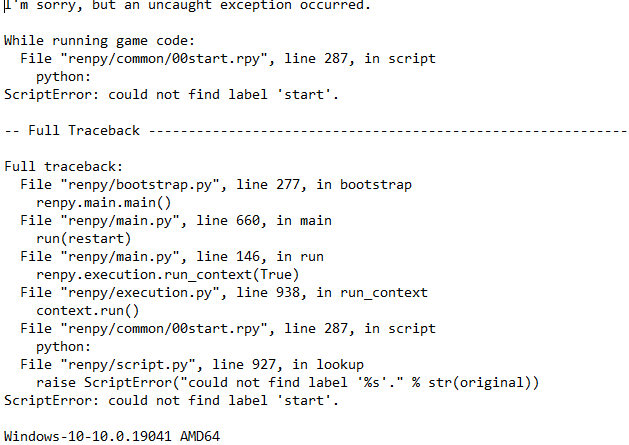
Thank you for sharing that. What version of the game are you using? When you see the game's folder, it should be "OurLife-1.7.1".
so I bought the dlc and downloaded it but when I downloaded the first one with 55 mb, It just shows up as plain paper? No folder so I’m not sure how to play the wedding dlc On our life can somebody help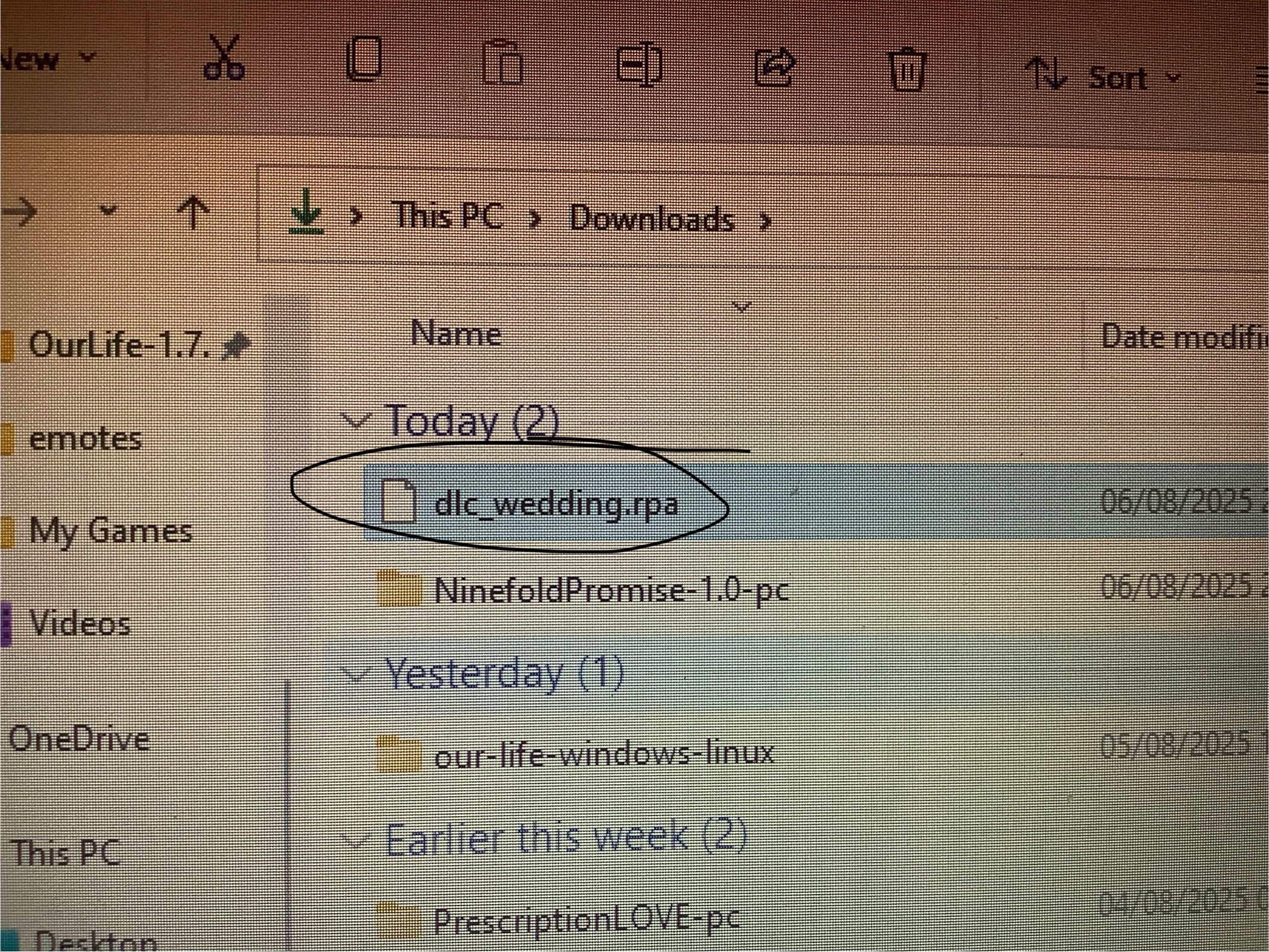
Nevermind! I scrolled through the other reply’s From other comments and it helped a lot xx
Great! Glad you were able to make it work, and thank you for playing.
i really loved the wedding dlc! i nearly cried it was that wholesome!
Thank you so much! Happy to hear you enjoyed it.
Hi! I just downloaded this DLC, but for some reason, it keeps saying that it isn't installed. I've tried following the steps, but I'm a little worried that maybe I'm doing something wrong. I just need a little help on HOW to get it to work :,)
I'm happy to help! When you downloaded the DLCs - the .rpa files - where did they end up? And where is the folder containing Our Life? You want to put those DLC files into the "game" folder within the larger Our Life folder.
So the .rpa file went into my downloads, and I have the folder containing Our Life! What i've tried to do is move the .rpa into the "game" folder, but it still says that the DLC isn't installed.
Hey! Just wanted to let you know that I finally got it to work! :) Thank you for your help!!
I'm so glad to hear that! Thank you so much for playing, and hope you enjoy.
i for the life of me cannot install this- for some reason theres just two folders and no matter WHERE I install them it just... wont show up in the game?? im genuinely so confused and honestly frustrated bc ive been doing this for over an hour now with no progress.
I'm sorry to hear that! Hopefully I can help. What operating system are you using, and where is the DLC file (it should be named "dlc_wedding.rpa") being downloaded?
Hi thank you so much for responding! I'm using windows and I dont see a file by that name, when i download it all I get is an empty folder labeled 'wedding'
OK, that's helpful. When you bought the Wedding Story here on itch.io, it should take you to a page where you can download the "dlc_wedding.rpa" file. That should let you download that file either to your "Downloads" folder on your PC, or to a place of your choice. Once you see that, you have manually put that file in the "game" folder of the main game, wherever you have that. The main game should be in a folder labeled "OurLife-1.7.11-pc", and inside there is the "game" folder you need. Let me know if you are able to locate the "dlc_wedding.rpa" file, and if you need more help getting it into the right spot!
Hi yes that did work, thank you so much! I think the point of confusion is that it was in a folder labeled 'game' just a different one. Again, thank you so much for your help!!
I'm so glad! Hope you enjoy the DLC.
i was smiling so hard the whole time, i even cried a little (a lot) during the whole DLC & game. i honestly love this so much
im so getting this as soon as i get money fr (edit: OK WHY DID I GET A DOWNVOTE.. WHAT DID I SAY THAT WAS WRONG)
Hi I have a MacBook Pro and I can't for the life of me figure out how to extract the zip file, anytime I try to it just opens the game, if there a video on how to do this I love a link, but I really just want to play the wedding dlc but I'm new to this MacBook and I could really use some help, thank you. :)
I'm sorry, I don't own a Mac, so I don't know for certain how it differs. Could you send me a screenshot of what you see when you download the file? I might be able to help!
I figured it out, I had to hold control z and then click on the our life to get the little menu thing, thank you for trying to help me tho, I really appreciate it. :)
OK, great! Glad that worked out, and of course, happy to help. Enjoy the game, and thank you for playing!
I have a question about buying DLC!! if I originally downloaded the base game in this website and already bought the DLC step 3 here in itch.io as well, can I buy the other DLCs in a different platform this time such as steam? :')
I'm sorry for the lateness of this reply! As for downloading the other DLCs on Steam, yes that should work. The base game on Steam is free, just like it is on itch.io. You can find any purchased DLCs on Steam in the local files, which is found by right clicking on the game in your Steam library, under "Manage" and then "Browse Local Files". Thank you so much for playing!
I might have to get some cash in my account first since I don't use it that much, probably has some forgotten bucks in it, I'm gonna buy it since I now believe in Crove Supremacy, btw I really like the Our life where we grew up together, Is really good vro:D
I just remembered I DON'T HAVE PAYPAL, I only have Gcash, is it possible tho? I don't kno what to doo
I purchased this on steam but on steam is not for Mac while on itch.io it is. Is there any way I can solve this? It doesn't even let me download the dlc from steam since I'm on a Mac :((
I'm not 100% sure this will work, but as long as you can single out the rpa file for the Step 4 DLC, you should be able to move it to a different version of the game. I don't know where to find this file on Mac, but it should be called "dlc_wedding.rpa". If you can find that, you should be able to move it to a different version of the base game and still get access to the content. See if you can locate it, and hopefully I can help you further!
The problem is that there is no way to download the file from steam. It only allows me to play it with the steam client (and therefore with windows in this case) even though i have the game installed from itchio in my mac. I guess there is no other way than buying it again from here(?)
I'm not familiar with Mac, but is there a way for you to "Browse Local Files" for your games on Steam? That would be how to track it down on Windows. I assumed that the Mac version of Steam had a similar function. Either way, we'll sort this out! Sorry for the inconvenience.
I found the local files (from the other games I own) now but since the dlc on steam is deemed as incompatible for Mac, it's in my library and it's not on my local files, it's like not downloaded (and there is no option to do it), it just stays on my library. Thank you anyways, it was my fault for not checking the compatibility on steam, I'll buy it again here some other time
Shoot! I'm sorry about that. Either way, thank you so much much for playing, and have a good one.
Hi do you have a tutorial on how to add the DLC? I've been struggling a bit to add it
Hopefully I can help! There are instructions here on the itch.io page, but I can walk you through it. What operating system are you using? Windows, Linux, Mac, or Android?
Thank you, but I ended up being able to figure it out thank you again.
OK! Glad to hear that, and hope you enjoy the game!